Arcade Pixels Procreate Color Palette: Your Digital Art Companion
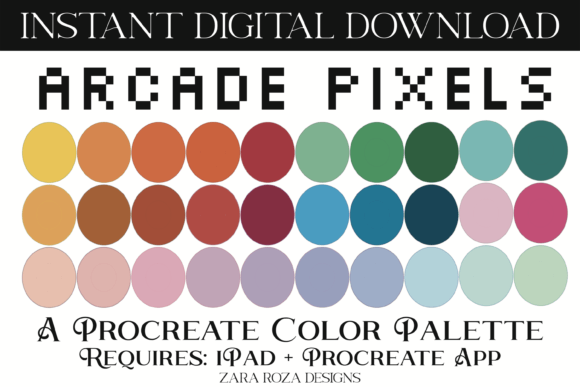
If you use Procreate on your iPad, you know the joy of creating but also the challenge of choosing colors. The Arcade Pixels Procreate Color Palette is a thoughtfully curated collection of 30 digital swatches designed to solve that problem. It’s a single file that imports directly into your app, giving you an instant library of hues that blend retro arcade energy with versatile, modern aesthetics.
What Makes This Palette Unique
This palette isn't a random assortment of colors. It’s a handpicked tool built around a specific, popular vibe. The core inspiration draws from the glowing screens and vibrant energy of vintage video games and cyberpunk arcades. You’ll find bright, glitchy neon tones—think vibrant blues, purples, pinks, and greens that pop with a digital rainbow effect.
But it cleverly balances that intensity with a wide range of softer, practical shades. This is where its true value shines. Alongside the bold arcade colors, you get a spectrum of calming, cozy pastels, pale tones, and earthy naturals. These include hues perfect for beach scenes, floral art, food illustration, and even natural-looking portraits. This duality means you can sketch a fierce cyberpunk character with electric blue highlights and then paint a serene, pastel landscape in the same session without searching for a new palette.
Who Benefits from Using Arcade Pixels
This palette supports a remarkably wide range of creators. Its appeal cuts across skill levels and disciplines.
- Beginners & Casual Users: It eliminates the overwhelm of color selection. Having a pre-made, cohesive set helps you start painting immediately, learning how colors work together without the theory.
- Digital Artists & Illustrators: Whether you're into character design, portrait art, or fantasy landscapes, the mix of bold and subtle tones offers flexibility. The retro vibes are perfect for gaming art, while the earthy shades support nature scenes.
- Graphic Designers & Lettering Artists: The palette provides ready-made aesthetics for projects needing a cute, classy, or elegant retro feel. It’s useful for creating social media graphics, logos with a 70s/80s/90s charm, or stylish calligraphy with a boho twist.
- Hobbyists in Niche Crafts: The colors translate beautifully to digital design for makeup concepts, lipstick shades, eye shadow looks, and nail art patterns. The pastels and brights offer a perfect digital testing ground for beauty aesthetics.
Essentially, if your work involves capturing a mood—whether it's energetic and glitchy or calm and sweet—this palette provides the color foundation to do it faster.
Practical Applications and Use Cases
Let’s look at some concrete examples of how you might use the Arcade Pixels Procreate Color Palette in your projects.
Imagine creating a series of digital posters for a fictional retro cafe. You could use the vibrant pinks and greens for the neon signage text, then employ the cozy pastels and earthy browns for the background and interior details. The entire project maintains a consistent vintage aesthetic without clashing.
A portrait artist might use the soft, natural tones for skin and hair colors, achieving a realistic base. Then, they could introduce a pop of the palette’s bright purple or blue for a striking, fantastical element like magical eye shadow or futuristic clothing accents, blending realism with arcade-inspired fantasy.
For someone sketching daily, the palette serves as a go-to starting point. A quick landscape sketch can use the beachy pale blues and sandy tones, while a lettering practice piece can experiment with the elegant, sweet pinks and greens for a floral-themed quote.
Important Considerations Before You Start
The Arcade Pixels palette is a powerful tool, but it’s essential to understand its scope and requirements.
First, it is only compatible with the Procreate app on an iPad or iPad Pro. You receive one .swatches file. Importing it is straightforward: locate the downloaded file on your iPad, press on it, and choose to open it in Procreate. The app will automatically add the new palette to your collection.
Second, while the 30 swatches are versatile, they are a curated set. It’s designed for specific aesthetics—retro vintage, cyberpunk arcade, pastel boho, and earthy floral. It won’t replace every custom color you might need for hyper-realistic work or completely different themes. It’s best seen as a foundational or inspirational palette that speeds up your process and keeps your color harmony consistent.
Finally, remember that a palette is a starting point. The real magic happens when you combine these swatches with Procreate’s incredible digital brushes. Use the bold colors with textured brushes for gritty cyberpunk scenes, or apply the pastels with soft watercolor brushes for calming floral art. The palette provides the color direction; your brush choices and technique bring the artwork to life.
Streamlining Your Creative Process
For professionals, educators, and freelancers, time is valuable. This palette is an efficiency tool. Instead of spending minutes or hours building a custom color set for a client project needing a “retro yet elegant” vibe, you can load Arcade Pixels and begin mocking up concepts immediately. This efficiency also benefits small business owners creating their own marketing visuals or bloggers developing consistent branded graphics for their sites.
The handpicked colors ensure that the overall mood remains cohesive, which is crucial for building a recognizable visual identity across multiple illustrations or designs. Whether you’re teaching digital art and want to give students a fun, focused color set to practice with, or you’re a freelancer juggling multiple projects, having a reliable, mood-specific palette at your fingertips can significantly streamline your workflow.
In the end, the Arcade Pixels Procreate Color Palette is more than just a list of colors. It’s a bridge between inspiration and execution. It captures the joyful energy of an arcade and the soothing charm of a vintage floral print, packaging them into a simple tool that empowers you to create faster and with greater confidence. By providing a balanced range from bold to calm, it adapts to your creative whims, supporting everything from a quick sketch to a complex professional illustration. Happy drawing.