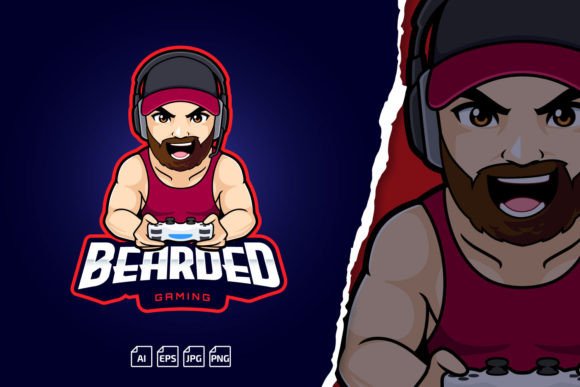
Level Up with a Bearded Man Gamer Logo Mascot
A strong visual identity can make the difference between a channel that fades into the background and one that people remember. For gaming creators, streamers, and competitive teams, a mascot does more than decorate a profile. It gives your audience a face to rally behind, a character that carries your tone, humor, and energy before you even say a word. The Bearded Man Gamer Logo Mascot Template steps into this role with a rugged, focused look that suits a wide range of gaming personalities and content styles.
What makes this particular template worth a closer look is its balance between bold attitude and genuine versatility. The bearded mascot isn't locked into one genre. With the right color adjustments, text changes, and minor tweaks, it can represent a battle-hardened FPS clan, a thoughtful strategy streamer, a retro-gaming channel, or a relaxed variety broadcaster. The design delivers presence without demanding that you fit into a narrow niche.
What the Bearded Man Gamer Logo Mascot Template Actually Provides
At its core, this is a fully scalable vector graphic built for professional and semi-professional use. The layered file structure allows you to isolate specific elements, recolor sections, adjust line weights, and swap out typography without starting from scratch. The template arrives in multiple formats, including Adobe Illustrator CC, legacy EPS for older software versions, a transparent PNG for quick deployment, and a high-resolution JPG preview. You don't need to be an advanced designer to get meaningful results, but experienced illustrators will appreciate the clean layering and well-organized artboard.
Typography often trips up logo projects because fonts carry licensing headaches or fall flat on readability. This package addresses the issue by featuring free-for-commercial-use fonts with direct links provided in the readme file. You can change the name, tagline, or team nickname with complete confidence that you're staying legally clear. The included tutorial video further lowers the barrier, walking through editing and export steps that might otherwise frustrate someone opening Illustrator for the first time.
Vector Scaling and the Advantage of Unlimited Flexibility
Pixel-based logos collapse the moment you need to enlarge them for a banner, poster, or overlay asset. The Bearded Man Gamer Logo Mascot Template sidesteps this entirely by providing true vector files. Whether you're printing a six-foot backdrop for a tournament or shrinking the mascot down to a sub-badge for Discord, edges remain crisp and professional. This unlimited scalability protects your investment because one design can serve every platform and format you encounter as your presence grows.
Creative Possibilities Across Platforms and Formats
A logo rarely lives in isolation. Once you understand how flexible the bearded man mascot can be, you begin to see applications that extend far beyond a profile picture. The design works as a connective thread across your entire visual ecosystem. When viewers recognize the same face on your Twitch overlay, YouTube banner, Kick emotes, and social media headers, a subtle but powerful familiarity builds. That consistency signals professionalism and makes your content feel cohesive even if your streaming schedule or content style evolves.
Consider breaking the mascot into component parts for different uses. The full head-and-shoulders version anchors your main branding. A cropped version, perhaps just the eyes and brow, becomes a stylized submark for smaller spaces. The beard alone can morph into a pattern or background texture for overlays. By thinking of the template as a kit of visual building materials rather than one fixed mark, you extend its usefulness significantly.
Designing Emotes and Small-Format Assets
Emotes thrive on clarity at tiny sizes, which challenges many detailed logos. The bearded man mascot has enough structure to read clearly when scaled down, but you may want to simplify further for emote use. Isolate the mascot's expression, exaggerate the eyes or mouth slightly, and export at the correct pixel dimensions for Twitch, Kick, or Discord. A focused glare becomes a "serious mode" emote. A slight modification to the eyebrows yields a surprised reaction. The template provides the foundation, and your small adjustments create a set of expressions that feel native to your brand.
Start with two or three emotes that cover the reactions your community uses most often. Test them at actual chat size before finalizing. What looks great on a large preview may lose detail when squeezed into a line of fast-moving text. The vector source file lets you refine and re-export endlessly without quality loss.
Adapting the Mascot to Different Gaming Genres and Team Identities
Your content genre shapes expectations around color, texture, and overall mood. A horror game streamer might take the bearded mascot into darker territory, adding shadows, muted reds, and atmospheric grain. A competitive esports organization may lean toward angular, high-contrast treatment with metallic accents and sharp typography. A cozy or variety streamer could soften the edges, introduce warm earth tones, and pair the mascot with rounded fonts that feel approachable.
The design's adaptability lies in your willingness to recolor, add or remove strokes, and experiment with background shapes. Don't feel bound by the default presentation. Use the layered file to test variations rapidly. Duplicate the artboard, try a different palette, refine, and compare. This iteration process often reveals a direction you wouldn't have considered on paper.
Practical Color and Contrast Guidelines
When you modify colors, think about where the logo will appear most often. Dark mode interfaces dominate streaming platforms and gaming communities, so a version that pops against dark backgrounds matters more than one designed for white pages. However, having an alternate light-background version prevents washouts on websites, merchandise, or print materials. Keep at least two master versions: one optimized for dark surfaces and one for light. The layered vector structure makes this easier than duplicating raster files and manually cutting out elements.
Contrast between the mascot illustration and your nameplate text also deserves attention. If the bearded character features intricate linework, a simple, bold sans-serif font underneath may balance the composition. If you prefer a more decorative typeface, consider reducing the illustration's complexity slightly so the two elements don't compete. Legibility at small sizes should guide your decisions more than how things look zoomed in at 300%.
Building a Recognizable Banner and Overlay System
Your banner introduces new visitors to your channel before they hear your voice or watch your gameplay. A well-designed banner using the bearded mascot communicates tone instantly. Place the mascot off-center to leave room for schedule information or social links. Use the background to suggest your primary game's aesthetic or your content's mood. The mascot anchors the composition, while the surrounding elements provide context.
Stream overlays benefit from restrained use of the mascot. A small, semi-transparent version in the corner of your gameplay screen adds branding without blocking crucial in-game information. Animated variants, created by exporting slightly altered poses or expressions from the editable file, can introduce subtle motion that catches the eye during transitions. Start simple. Overlays that try to do too much distract viewers from the content they came to watch.
Creating a Unified Visual Language Across Teams
For esports teams or multi-streamer groups, the template becomes a unifying element that still allows individual expression. Each member can adjust the mascot's color scheme to match their role or personal brand while retaining the recognizable bearded silhouette. This approach works well for organizations that want cohesion without forcing everyone into identical styling. The central design DNA remains clear, but the variations signal that real personalities sit behind the screens.
Team jerseys, social media headers, and tournament graphics all benefit from this consistency. When sponsors or partners see a polished, repeatable visual language, they're more likely to perceive your group as organized and serious about long-term growth.
Typography Choices and Name Customization
The ability to change your logo's name and font opens doors that pre-made logos with locked text simply cannot offer. You're not stuck with a placeholder. Whether you need to display a gamer tag, team abbreviation, or full organization name, the editable text layers let you shape the typography to match the mascot's personality. Angular, geometric fonts reinforce a competitive, high-stakes tone. Rounded, hand-drawn styles evoke a friendly, community-first atmosphere.
Pay attention to kerning and spacing, especially if your name includes unusual letter combinations. Illustrator's character panel gives you precise control. The tutorial video included with the template covers the basics, but don't hesitate to spend extra time refining the text once the core edits are done. Small adjustments here separate amateur-looking results from polished, professional marks.
Using Fonts That Perform Well Across Devices
Not every font renders beautifully on streaming overlays, mobile screens, and print materials. Choose typefaces with clear letterforms, adequate x-height, and open counters. The free commercial fonts recommended with the template have been selected with readability in mind, but you always have the freedom to substitute your own. Test the font at actual use sizes before committing. What seems elegant in a design program can turn muddy on a 1080p stream or a phone screen.
Practical Workflow for Beginners and Experienced Designers
Open the AI or EPS file, locate the clearly labeled layers, and start exploring. Turn layers on and off to understand how the illustration is constructed. Change colors using global swatches if available, or use the recolor artwork tool for broader experimentation. Save incremental versions as you go, and keep your original file untouched. This non-destructive approach lets you return to a clean starting point whenever an experiment goes sideways.
For those who are less comfortable in Illustrator, the transparent PNG provides a usable asset right away. You can import it into simpler programs for basic color overlays or combine it with text in Canva or similar tools. The full creative control sits in the vector files, but you're never forced to use them before you're ready.
When to Reach Out for Support
Editing complex layered files occasionally hits snags. If you experience problems with modification, the creator offers direct contact for assistance. This support channel exists to help you move past technical hurdles rather than leave you stuck. Many users find the tutorial video resolves most questions, but knowing a human is available reduces the stress of tackling a design task outside your comfort zone.
Future-Proofing Your Brand Identity
As your platform grows, your logo will appear in contexts you haven't yet imagined. The Bearded Man Gamer Logo Mascot Template gives you a foundation that can evolve alongside your content. Because you control every layer and color, refreshing the look for a rebrand or milestone event doesn't require starting from zero. Adjust the palette, update the typography, or add a secondary graphic element. The core recognition factors remain intact while the presentation matures.
Investing time now in learning the file structure and customization options pays compounding dividends. Each new emote, banner, or overlay asset draws from the same source, reinforcing your brand rather than fragmenting it. View the template not as a single logo but as a flexible visual system that supports your creative work for years.