YouTube Thumbnail & Web Banner Design Made Simple
The first thing people notice about your channel or website is rarely the content itself. It is the visual handshake—the thumbnail that stops a scroll, the banner that frames your brand. YouTube Thumbnail and Web Banner Design isn’t just about making things look pretty; it is about creating instant trust, communicating tone, and signaling to the right audience that they are in the right place. For many creators and professionals, a fully editable PSD template becomes the practical middle ground between hiring an expensive designer and wrestling with tools they haven’t mastered yet.
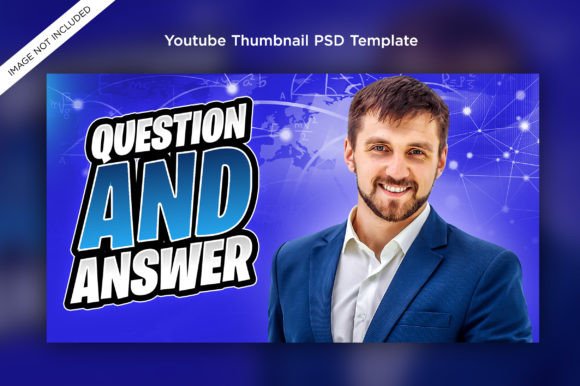
A template built at 1920×1080 pixels in RGB color mode, with well-organized layers and free fonts, is designed to remove the heavy lifting while keeping the creative reins in your hands. The fact that images are not included is actually a feature—it pushes you to drop in your own character renders, product shots, or portrait photography so the final result feels authentically yours. Whether you run a gaming channel, a coaching business, or a community blog, the structure is there; you simply decide what story each visual will tell.
Why Visual Consistency Matters Across Channels and Audiences
People arrive at your content with wildly different expectations. A twenty-something gamer browsing YouTube after midnight is drawn to bold contrast and character close-ups. A small business owner scanning search results for a tutorial needs clarity and a clear text hierarchy. A freelancer evaluating a potential collaborator’s website first notices the banner’s polish—or lack of it. YouTube Thumbnail and Web Banner Design directly influences how each of these audiences judges credibility before a single word is read or a second of video is watched.
The same thumbnail principles that work for a gaming channel can feel entirely wrong for an educational series. That’s why a template’s editability matters so much. When you can modify every text layer, adjust color overlays, and rearrange composition points without touching the base structure, you avoid the beginner’s trap of starting from a blank canvas while still communicating with purpose. Different audiences need different visual dialects, and a layered PSD gives you the vocabulary to speak several of them fluently.
Who Benefits Most from a Fully Editable Template?
Not everyone needs the same things from a design resource. Understanding where you fall on the spectrum of creative confidence can help you decide whether this approach truly fits your workflow.
Gaming Creators and Streamers
For gaming YouTubers, the thumbnail is often the single highest-stakes piece of design work they’ll do all week. A successful gaming thumbnail usually combines a recognizable game asset, a dynamic character pose, and a short emotion-driven phrase. A template sized at 1920×1080 gives room to play with scale and layering. Because the image is not included, a creator can swap out the background screen capture and hero render for each upload, keeping series unity while making every episode feel fresh. The well-organized layers mean they can isolate the glow behind the character, change the outline color, or quickly adjust the text treatment without accidentally breaking the main composition.
For a streamer who also maintains a web presence, the same visual DNA can extend into a channel banner. Reusing color palettes and type styles across both formats helps a brand feel intentionally crafted rather than thrown together on a whim.
Freelancers and Marketing Professionals
A marketer or freelance social media manager might manage three different clients in a single afternoon. For them, speed isn’t a luxury; it is a necessity. A well-organized PSD template where layers are clearly named and grouped means they can open a file, replace the placeholder text, drop in a client-approved image, and export a professional banner or thumbnail in less time than it takes to write a design brief. They care less about learning advanced Photoshop techniques and more about reliability and repeatable output. When a template uses only free fonts, they avoid licensing headaches and can confidently share source files with clients who may need to make minor text changes later.
Educators, Bloggers, and Niche Publishers
Someone teaching a skill or sharing deep dives into a hobby might not think of themselves as a “designer.” Yet their audience still judges the learning experience partly by how clear and calming the visuals feel. A math tutor’s web banner needs to look crisp on both a desktop and a mobile device. A gardening blogger’s video thumbnail should highlight the plant or harvest result without chaotic clutter. The 1920×1080 canvas in RGB gives a generous working area that scales gracefully. With a template, they can focus on readability—choosing font weights and contrast that work on small screens—while the complex layout decisions are already solved for them.
Hobbyists and First-Time Creators
There’s a special kind of motivation that comes from seeing your content look polished even when you are just starting out. A hobbyist sharing their painting process or a new podcaster experimenting with video clips might not be ready to commit money to custom design work. A template that is easy to edit, with layers they can toggle and experiment with, becomes a learning tool as much as a production asset. They discover how shadows and highlights affect depth, how alignment creates order, and how a consistent banner strengthens channel identity—all without needing to open a single tutorial first.
Breaking Down the Features That Shape the Experience
Understanding what you are actually getting in a YouTube Thumbnail and Web Banner Design template prevents frustration later. The listed features are not just bullet points; they directly translate into creative freedom and practical workflow advantages.
- Fully Editable Template: Every element that was designed can be changed. You are not locked into a specific headline or a fixed background. This is crucial if you plan to produce multiple thumbnails from the same root file, each tailored to a different topic or game.
- PSD Format: Photoshop remains the broad standard for layered raster and vector compositing. Even if you use alternatives like Photopea or Affinity Photo, the layer structure typically imports cleanly, giving you flexibility across software ecosystems.
- Size 1920×1080 Pixels RGB Color: This is the native 16:9 aspect ratio for HD video and standard web banners. RGB ensures colors are screen-optimized. When you export JPEG or PNG thumbnails, you won’t need to worry about clipping or letterboxing on YouTube’s interface.
- Well Organized Layer, Easy to Edit: Nothing kills momentum faster than hunting through 50 unnamed layers. Good organization means intuitive folders like “Text,” “Background,” “Character,” and “Effects.” For a beginner, this reduces errors. For a pro, this makes bulk edits across multiple templates feasible.
- Image Not Included: This is often misunderstood. Rather than being a limitation, it’s an invitation to imprint your own visual identity. Your gameplay screenshot, your portrait, your product mockup—these are what make the design yours. A template without embedded stock imagery also avoids copyright gray areas.
- Font Free: All typefaces used are freely available for commercial use. That means you can upload your thumbnails to monetized channels, sell merchandise with the same banner styling, or deliver client work without facing unexpected font license fees.
Different Priorities for Different People
When you look at the same template, the value you extract depends heavily on what you prioritize. A creator might care most about creativity—having room to add personal illustrations or intense lighting effects. A business owner might care about reliability—knowing the file won’t break when they adjust a single line of text. An educator might prioritize clarity—making sure the title remains legible even as YouTube compresses the thumbnail into a tiny mobile preview.
Consider a practical scenario: a gaming channel manager needs to deliver seven thumbnails for a weekly series. With a template, they can batch-adjust the episode number, keep the game title layer locked, and only swap the central action screenshot. They finish in half an hour. A freelance graphic designer, on the other hand, might start from the same template but push it further—adding custom vector shapes, adjusting layer masks for a unique moody look, and then saving their variant as a new master for future tales. The foundation didn’t limit either user; it met them at their skill level.
How to Decide If This Approach Fits Your Goals
Honest self-assessment saves time and creative energy. Ask yourself whether you find designing from scratch energizing or draining. If you love every step of the process, you might only need a template for the times you are under a tight deadline. If you dread opening Photoshop, a well-organized PSD with free fonts might be the bridge that keeps your channel looking consistent while you focus on content quality.
Think about your output volume. A single video every few months can justify spending hours on one custom thumbnail. But a channel posting three times a week or a freelancer serving multiple brands will find that templates turn a marathon into a sprint. The 1920×1080 canvas also matters if you plan to repurpose the same artwork across different platforms—a YouTube banner can often double as a Facebook cover or a newsletter header with minimal cropping.
For those concerned about “cookie-cutter” visuals, remember that templates are a starting point, not a finished identity. Because images are not included, your choice of photography, screen capture, or illustration injects instant personality. The layered structure lets you recolor, retexture, and reimagine. Two creators could download the same gaming thumbnail layout and, by inserting a vibrant sunrise backdrop versus a dark cyberpunk cityscape, make them unrecognizable from each other.
Bringing It into Your Daily Creative Life
Imagine a morning where instead of staring at an empty document, you open a neatly structured PSD, type in your episode title, drag your latest gameplay highlight onto the background layer, and within minutes you have a thumbnail that matches the polished look of your previous videos. That kind of consistency builds audience trust over time. The same ritual applies to web banners: refreshing seasonal branding, promoting a live event, or highlighting a community milestone becomes less of a chore and more of a satisfying tweak.
The absence of included images and the focus on free fonts might at first seem like small details, but they quietly remove the two biggest friction points: worrying about usage rights and feeling tied to someone else’s visuals. You remain the creative director, with the template working as your silent, efficient assistant.
When someone messages you to ask how you make your thumbnails look so professional, you won’t need to explain a complex multi-software pipeline. You will simply know that you invested in a foundation that respects your time and your vision. A well-organized layer panel is a kindness, and a free font library is a gift that keeps your commercial options open. Whether you’re breathing life into a new gaming channel, teaching algebra through video, or building a freelance portfolio that gets noticed, the right YouTube Thumbnail and Web Banner Design resource meets you exactly where you are and helps you appear one step ahead.